
Magentus Practice Management FHIR Implementation Guide
1.2.60 - ci-build

Magentus Practice Management FHIR Implementation Guide
1.2.60 - ci-build
Magentus Practice Management FHIR Implementation Guide - Local Development build (v1.2.60) built by the FHIR (HL7® FHIR® Standard) Build Tools. See the Directory of published versions
The Magentus Requesting Service supports pathology and radiology diagnostic requesting with an intent to eventually support the round tripping of requests and reports. The profiles in this section attempt to leverage common foundations for both flavours of requests while allowing for relevant domain specific specialisations.
Some features to note:
ServiceRequest/Task pattern that is defined as Option F in the FHIR Workflow description. This uses a Task to track the fulfillment of a ServiceRequest, primarily through the status and businessStatus attributes.Task for each ServiceRequest, we also allocate a Group Task that provides a resource coordinating a set of individual Task's for each ServiceRequest (each individual test or service where multiple may constitute a single order). In addition to the explicit Group Task, they are also implicitly bound together through their common groupIdentifier attribute. The reason for an explicit Group Task resource is to aid searching and discovery of complete orders rather than needing to discover each part of the order in isolation.Tasks are also used to track the workflow associated with CommunicationRequests. These are used to track fulfilment of communication with a patient about their diagnostic service or with a clinician for urgent results. In future, this will also be used to carry the existing copyTo information for copying results to other clinicians.The FHIR Resources used by the Magentus Requesting Service are shown in the diagram below.
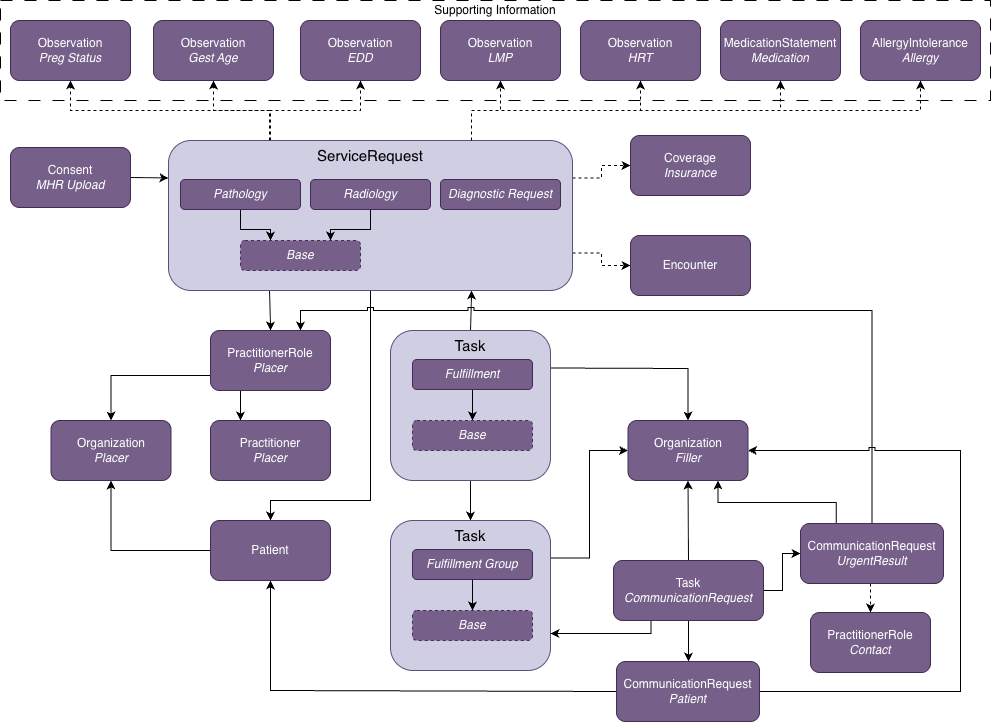
Typical sequence of interactions involving Placers and Fillers.
The FHIR Resources generated by the Magentus Requesting Service are listed below.
It should be noted that Diagnostic Service Request should be regarded as a legacy profile and instead replaced by explicit Pathology Request and Radiology Request use as these are more specific to each of their domains of use.
| Magentus Profile | Abstract | FHIR® Resource |
|---|---|---|
| Diagnostic Service Request (legacy) | No | ServiceRequest |
| Pathology Request | No | ServiceRequest |
| Radiology Request | No | ServiceRequest |
| Diagnostic Request Base | Yes | ServiceRequest |
| Diagnostic Request Group Task | No | Task |
| Diagnostic Request Task | No | Task |
| Diagnostic Request Task Base | Yes | Task |
| Magentus Profile | FHIR® Resource |
|---|---|
| Communication Request to Patient | CommunicationRequest |
| Communication Request to Provider | CommunicationRequest |
| Communication Request Task | Task |
Fulfilment Tasks are linked to an owner organization to indicate a preferred or assigned filler. From a placer's perspective these are diagnostic service brands. From a filler's perspective, brands belong to an organizational entity. We represent these using a child brand Organization linked to a parent Organization. This is important for fillers discovering new requests as they can discover across all brands by searching for brands that have a known parent without needing to search for requests for each individual brand Organization.
| Magentus Profile | FHIR® Resource |
|---|---|
| Parent Diagnostic Organization | Organization |
| Pathology Brand Organization | Organization |
| Imaging Brand Organization | Organization |
ServiceRequests can include a set of supporting information that provides relevant clinical background for the patient. They are linked from ServiceRequest.supportingInfo which is a list of resource references. All supporting information resources should include a narrative representation, e.g. Observation.text, so that the resource can be processed into text-based clinical notes if the structured information in the resource cannot be processed. Since a diagnostic order can include multiple requests, common supportingInfo should be referenced from each ServiceRequest. This means that referenced resource should be a full resource in the order transaction and not contained within the ServiceRequest.
Additional resources are contained within the Requesting resources above, the FHIR profiles for these resources are listed below.
| Profile | FHIR® Resource |
|---|---|
| Request Coverage | Coverage |
| Request Encounter | Encounter |
| Request PractitionerRole Contact | PractitionerRole |
The eRequesting workflow describes the interactions between a placer and a filler (or alternate filler) via the eRequesting FHIR Service.
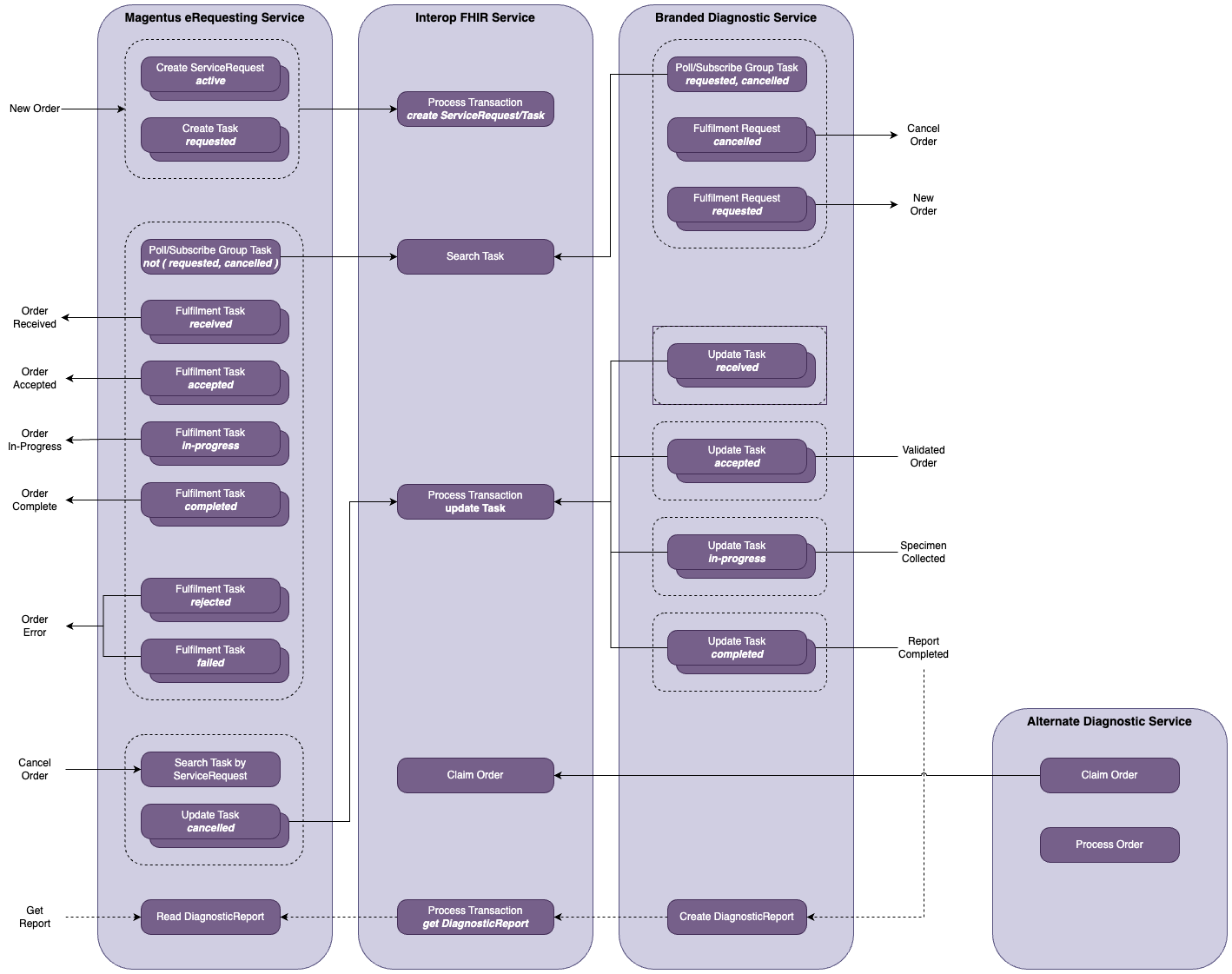
While our use of individual ServiceRequests and Tasks could allow for unique attributes such as Status, Note, etc., we currently require that all child ServiceRequest and Task share common values, including that within the Group Task.
All ServiceRequest and Task resources carry an optional meta.tag slice called placer-family that identifies the placer system that generated the order (e.g. genie, gentu, acmepms). The tag is bound to the EOrdersPlacerTagValueSet and uses the code system http://fhir.geniesolutions.io/CodeSystem/eorders-placer-tag-codesystem.
The EOrdersSubmitOrderBundle profile enforces a consistent-placer-tag invariant that requires all Task and ServiceRequest entries within a submit-order transaction Bundle to carry the same placer-family tag value. This ensures that the placer identity is consistent across the entire order.
A placer system interacts with the Requesting Service through a series of operations that follow a natural workflow:
Subscription across one or more brand partitions so that the placer receives notifications when order statuses change. See also Subscribing to Requests for details on subscription criteria and handling notifications._include and _revinclude parameters.The Get Brands operation allows a placer to discover available diagnostic service brand Organizations (Pathology Laboratories and Imaging Services). This is typically the first step in the placer workflow — the placer retrieves the list of brands to present to the requesting clinician.
See Get Brands Operation Definition for the full specification.
| Direction | Name | Type | Card. | Description |
|---|---|---|---|---|
| in | serviceType | code | 0..1 | Filter by pathology or imaging. If omitted, both types are returned. |
| in | parentOrganization | Reference | 0..1 | Filter to brands belonging to a specific Parent Diagnostic Organization. |
| out | brand | Organization | 0..* | A brand Organization resource (Pathology Laboratory or Imaging Service). |
POST [base]/Organization/$get_brands

{
  "resourceType": "Parameters",
  "parameter": [
    {
      "name": "serviceType",
      "valueCode": "pathology"
    }
  ]
}
POST [base]/Organization/$get_brands

{
  "resourceType": "Parameters",
  "parameter": []
}
The Submit Order operation is used to submit a diagnostic order (pathology or radiology) as a transaction Bundle. The Bundle must conform to the EOrdersSubmitOrderBundle profile.
The HTTP response body is always a single resource. Check resourceType to determine the outcome:
resourceType |
Condition | Details |
|---|---|---|
Bundle (type transaction-response) |
Order is directed and successfully processed | All fulfillment Tasks had an owner and the transaction committed. |
OperationOutcome (severity error or fatal) |
Order failed validation or cannot be processed | Do not retry without correcting the reported issues. |
OperationOutcome (severity information) |
Order is undirected — no fulfillment Task has an owner |
The order has been lodged for later routing. Not an error. |
See Submit Order Operation Definition for the full specification.
When no fulfillment Task carries a Task.owner, the order is undirected — it has been lodged in the registry but not assigned to a specific filler. The $submit_order operation returns an informational OperationOutcome to confirm this.
The lifecycle of an undirected order after submission:
Task(s) sit in requested status with no owner.$claim operation with the requisition identifier (barcode) and their organisation reference. This assigns Task.owner to the claiming filler and returns a new group Task.Note that fillers cannot search for or subscribe to undirected orders — filler discovery is based solely on Task.owner. An undirected order becomes visible to a filler only after they claim it using a requisition identifier provided by the patient.
The placer discovers that an undirected order has been claimed by subscribing to status changes on the group Task (e.g. Task?status=received,accepted) — the same subscription pattern used for directed orders. No special handling is required on the placer side.
The EOrdersSubmitOrderBundle is a transaction Bundle that must contain the following entries at minimum:
| Slice | Profile | Card. | Description |
|---|---|---|---|
| patient | GSPatient | 1..1 | The patient the order is for. |
| organization | GSOrganization | 1..* | Requesting organization and/or filler brand organizations. |
| practitioner | GSPractitioner | 1..1 | The requesting practitioner. |
| practitionerRole | EOrdersPractitionerRole | 1..1 | The requesting practitioner's role. |
| serviceRequest | EOrdersDiagnosticRequest, EOrdersPathologyRequest, or EOrdersRadiologyRequest | 1..* | One or more diagnostic service requests. |
| fulfillmentGroup | EOrdersTaskFulfillmentGroup | 1..1 | The group Task coordinating all individual fulfillment Tasks. |
| fulfillmentRequest | EOrdersTaskFulfillmentRequest | 1..* | One fulfillment Task per ServiceRequest. |
| consent | EOrdersConsentWithdrawl | 0..* | Optional consent withdrawal resources. |
| communicationRequestPatient | EOrdersCommunicationRequestPatient | 0..* | Optional patient communication preferences (e.g. do not send SMS). |
| communicationRequestProvider | EOrdersCommunicationRequestProvider | 0..* | Optional provider communication (e.g. urgent phone/fax). |
| taskCommunicationRequest | EOrdersTaskCommunicationRequest | 0..* | Tasks tracking communication request fulfillment. |
All entries must include fullUrl and request.method = PUT.
All ServiceRequest and Task entries should carry a placer-family meta tag identifying the placer system. The Bundle enforces a consistent-placer-tag invariant requiring all Task and ServiceRequest entries to use the same tag value — see Placer Family Tag for details.
POST [base]/$submit_order

{
  "resourceType": "Parameters",
  "parameter": [
    {
      "name": "order",
      "resource": {
        "resourceType": "Bundle",
        "meta": {
          "profile": [
            "http://fhir.geniesolutions.io/StructureDefinition/eorders-submit-order-bundle"
          ]
        },
        "type": "transaction",
        "timestamp": "2024-01-15T10:30:00+11:00",
        "entry": [
          ...
        ]
      }
    }
  ]
}
The following example Bundles conform to the EOrdersSubmitOrderBundle profile and can be used as reference when constructing orders:
| Example | Description |
|---|---|
| FBC + LFT Request | A pathology order containing FBC and LFT service requests with two fulfillment request Tasks. |
| Diagnostic Request Example | A diagnostic order with a pathology laboratory filler, consent withdrawal, and communication requests. |
| Genie Generated Pathology Request | A complete pathology request as generated by the Genie clinical desktop application. |
| Pathology Request Example | A pathology request demonstrating supporting clinical information including pregnancy status, gestational age, and estimated date of delivery. |
The following examples illustrate each possible response from the operation:
| Example | Description |
|---|---|
| Directed Order Success | Transaction-response Bundle returned when all fulfillment Tasks have an owner and the order is successfully processed. |
| Error Response | OperationOutcome returned when the submitted Bundle fails validation or cannot be processed. |
| Undirected Order Response | Informational OperationOutcome returned when no fulfillment Task has an owner; the order has been lodged for later routing. |
The Add Placer Subscription operation registers a Subscription resource across one or more SmileCDR partitions mapped from brand Organization references. This allows a placer system to register for notifications across multiple diagnostic service brands in a single call rather than manually creating subscriptions in each brand's partition.
Each Organization reference (literal or logical) is resolved to the corresponding SmileCDR partition. The provided Subscription is then submitted to each partition. The operation returns a result per organization indicating success or failure.
See Add Placer Subscription Operation Definition for the full specification.
| Direction | Name | Type | Card. | Description |
|---|---|---|---|---|
| in | subscription | Subscription | 1..1 | The Subscription resource to register in each brand partition. See Subscribing to Requests for subscription criteria format. |
| in | organization | Reference | 1..* | References to brand Organizations (Pathology Laboratory or Imaging Service). May be literal or logical (identifier-based) references. |
| out | result | (part) | 1..* | One result per organization containing organization (Reference), outcome (Coding), and optionally subscription (Reference to the created Subscription). |
| Code | Display | Description |
|---|---|---|
| ok | OK | Subscription was successfully created in the partition. |
| organization-not-found | Organization Not Found | The referenced Organization could not be resolved. |
| partition-not-found | Partition Not Found | No SmileCDR partition is mapped to the resolved Organization. |
| subscription-invalid | Subscription Invalid | The Subscription resource failed validation. |
| subscription-exists | Subscription Exists | An equivalent Subscription already exists in the partition. |
| error | Error | An unexpected error occurred. |
POST [base]/Subscription/$add_placer_subscription

{
  "resourceType": "Parameters",
  "parameter": [
    {
      "name": "subscription",
      "resource": {
        "resourceType": "Subscription",
        "criteria": "Task?status=requested,cancelled&_tag=fulfillment-task-group&owner.partof.identifier=http://ns.electronichealth.net.au/id/hi/hpio/1.0|8003123456789123",
        "status": "requested",
        "reason": "Task requested and cancelled subscription",
        "channel": {
          "type": "rest-hook",
          "endpoint": "https://webhook.site/bbd78ee4-e267-4633-8acc-38a5e1dc54a0",
          "header": ["Authorization: Bearer <access-token>"]
        }
      }
    },
    {
      "name": "organization",
      "valueReference": {
        "reference": "Organization/dda4a656-f60e-11ed-baf1-d2cbed391bcf",
        "display": "Magentus Pathology Lab Brand A"
      }
    },
    {
      "name": "organization",
      "valueReference": {
        "reference": "Organization/another-lab-brand-id",
        "display": "Magentus Pathology Lab Brand B"
      }
    }
  ]
}
{
  "resourceType": "Parameters",
  "parameter": [
    {
      "name": "result",
      "part": [
        {
          "name": "organization",
          "valueReference": {
            "reference": "Organization/dda4a656-f60e-11ed-baf1-d2cbed391bcf"
          }
        },
        {
          "name": "outcome",
          "valueCoding": {
            "system": "http://fhir.geniesolutions.io/CodeSystem/eorder-add-placer-subscription-result-codesystem",
            "code": "ok",
            "display": "OK"
          }
        },
        {
          "name": "subscription",
          "valueReference": {
            "reference": "Subscription/sub-12345"
          }
        }
      ]
    },
    {
      "name": "result",
      "part": [
        {
          "name": "organization",
          "valueReference": {
            "reference": "Organization/another-lab-brand-id"
          }
        },
        {
          "name": "outcome",
          "valueCoding": {
            "system": "http://fhir.geniesolutions.io/CodeSystem/eorder-add-placer-subscription-result-codesystem",
            "code": "ok",
            "display": "OK"
          }
        },
        {
          "name": "subscription",
          "valueReference": {
            "reference": "Subscription/sub-12346"
          }
        }
      ]
    }
  ]
}
Tip: The Subscription criteria and channel format used in this operation is identical to the format described in Subscribing to Requests. The key difference is that this operation handles distributing the Subscription across brand partitions automatically.
In order to receive subscription notifications from the FHIR Server when resources of interest are created or updated, a subscription is registered. A subscription request includes the following properties.
| Property | Description | Example |
|---|---|---|
| criteria | Search criteria to match resources of interest | Task?status=requested,cancelled&_tag=fulfillment-task-group&owner.partof.identifier=http://ns.electronichealth.net.au/id/hi/hpio/1.0|8003123456789123 |
| status | Fixed: requested | requested |
| channel.type | Fixed: rest-hook | rest-hook |
| channel.endpoint | Web service URL where webhook is posted | https://webhook.site/bbd78ee4-e267-4633-8acc-38a5e1dc54a0 |
| channel.header | Authorization header to be used in the subscription notification | Authorization: Bearer secret-token-abc-123 |
In this case we are interested in Task resources that are
requested or cancelled status,Task group, not an individual Task fulfillment, andOrganization with HPI-O of 8003123456789123.It is also possible to subscribe to each individual child brand rather than via the parent but this is more cumbersome and requires updating everytime a new brand is added.
Example
The following example creates a new Subscription for the Task resource with criteria as described above.
POST [base]/Subscription

{
  "resourceType": "Subscription",
  "criteria": "Task?status=requested,cancelled&_tag=fulfillment-task-group&owner.partof.identifier=http://ns.electronichealth.net.au/id/hi/hpio/1.0|8003123456789123",
  "status": "requested",
  "reason": "Task requested and cancelled subscription",
  "channel": {
    "type": "rest-hook",
    "endpoint": "https://webhook.site/bbd78ee4-e267-4633-8acc-38a5e1dc54a0",
    "header": ["Authorization: Bearer secret-token-abc-123"]
  }
}
The Subscription endpoint can also be used to Search, Read, Update and Delete as per the standard FHIR REST API pattern.
A subscription notification is received as a POST request on the endpoint specified in the subscription registration request. The POST request has an empty body.
Example
POST https://webhook.site/bbd78ee4-e267-4633-8acc-38a5e1dc54a0
Authorization: Bearer <access-token>
The subscription notification shall respond as quickly as possible with a success status of 200 OK or 202 Accepted, and an empty body. The latter is normally returned when the request is accepted for processing but processing will commence after the response has been returned, which is the preferred approach for subscription notifications.
Any error response may result in a subsequent retry by the FHIR Server to submit the Subscription Notification until the number of retries is exceeded, at which time the FHIR Server will stop the subscription. See Managing Subscriptions and Errors for more details.
When a subscription notification is received, perform a Search request with the corresponding criteria along with a _lastUpdated parameter with the timestamp when the last search request was performed with the gt prefix (see https://hl7.org/fhir/r4/search.html#prefix).
Example
GET [base]/Task?status=requested,cancelled & \
owner.identifier=http://ns.electronichealth.net.au/id/hi/hpio/1.0|8003123456789123 & \
_lastUpdated=gt2022-12-13T12:30:00Z
In order to retrieve the entire Orders, use the following _include and _revinclude parameters.
| Parameter | Value | Description |
|---|---|---|
| _include | Task:patient | Patient |
| _include | Task:owner | Organization as the designated filler |
| _include | Task:requester | Clinician creating the request |
| _revinclude | Task:part-of | Group task for an individual Task |
| _revinclude:iterate | CommunicationRequest:about:Task | Communication with patient or requesting clinician |
| _include | Task:focus | ServiceRequest associated with Task |
| _revinclude:iterate | ServiceRequest:copiesTo | PractitionerRoles where reports should be sent |
| _include:iterate | PractitionerRole:practitioner | Practitioner associated with the requester |
| _include:iterate | PractitionerRole:organization | Organization associated with the requester |
| _revinclude:iterate | Consent:data:ServiceRequest | Consents linked to the ServiceRequests |
Example
GET [base]/Task?status=requested,cancelled & \
owner.identifier=http://ns.electronichealth.net.au/id/hi/hpio/1.0|8003123456789123 & \
_lastUpdated=gt2022-12-13T12:30:00Z &\
_include=Task:patient & _include=Task:owner & _include=Task:requester & _revinclude=Task:part-of & \
_revinclude:iterate=CommunicationRequest:about:Task & \
_include=Task:focus & _revinclude:iterate=ServiceRequest:copiesTo & \
_include:iterate=PractitionerRole:practitioner & _include:iterate=PractitionerRole:organization & \
_revinclude:iterate=Consent:data:ServiceRequest
Fillers have two opportunities to update fulfilment Tasks. The first is with a combination of status (where values are fixed), businessStatus, and statusReason. The second is through adding outputs from fulfilment to Task.output. These two fulfilment updates are described below.
Task statuses are fixed and defined within the FHIR R4 Task resource, more specifically the Task Status ValueSet. The sequencing of these statuses are prescribed by the Task State Machine.
In addition to status, Task supports a businessStatus attribute which further refines status. This is a CodeableConcept which may or may not be coded. We have defined a set of useful codes which may be extended.
| Pathology | Radiology | Task Status | Code | Display | Description | Set by |
|---|---|---|---|---|---|---|
| ✓ | ✓ | requested | claimed-request | claimed request | Diagnostic request has been claimed | placer |
| ✓ | ✓ | accepted | booked | booked | Service has been booked | filler |
| ✓ | ✓ | accepted | scheduled | scheduled | Service has been scheduled | filler |
| ✓ | ✓ | cancelled | claimed-cancel | claimed cancel | Diagnostic request has been claimed by an alternative filler | placer |
| ✓ | ✓ | cancelled | user-cancelled-request | user cancelled request | Diagnostic request had been cancelled by the placer | placer |
| ✓ | ✓ | cancelled | cancel-handled | cancel handled | Cancellation has been handled by the filler | filler |
| ✓ | ✓ | rejected | invalid-request-data | invalid request data | Rejected fulfilment due to an issue with the request data | filler |
| ✓ | ✓ | rejected | inaccessible-request-data | inaccessible request data | Rejected fulfilment due to data being unavailable | filler |
| ✓ | ✓ | in-progress | preliminary | preliminary | Preliminary result completed | filler |
| ✓ | ✓ | completed | authorised | authorised | Authorised report created | filler |
| ✓ | ✓ | completed | addendum | addendum | Addendum created for reporting | filler |
| ✓ | in-progress | collected | collected | Specimen has been collected in lab collection centre | filler | |
| ✓ | in-progress | in-lab | in-lab | Specimen is being processed in the pathology lab | filler | |
| ✓ | accepted | checked-in | checked-in | Patient has checked in for service | filler | |
| ✓ | in-progress | preparation | preparation | Patient has been prepared for the radiology service | filler | |
| ✓ | in-progress | acquisition | acquisition | Image has been acquired at radiology service | filler | |
| ✓ | in-progress | interpretation | interpretation | Image has been interpreted at radiology service | filler |
We currently define two types of output:
DiagnosticReport reference to an imaging report or a pathology report.BookingSlot reference allowing for booking/appointment information to be shared back to the placer using a profile of the FHIR slot. The Slot contains timing information and references a Schedule which references a HealthcareService that ultimately references the Location information containing name and address. Most slot information is optional. This may be especially useful for imaging appointments and should be aligned with a booked businessStatus.Rather than replacing a whole Task resource with PUT, fillers should update the group and individual Tasks using FHIR Patch (FHIRPath-based) via a transaction Bundle. This minimises the chance of overwriting concurrent updates from other parties.
Each entry in the transaction Bundle has request.method = PATCH and carries a Parameters resource as its payload. The Parameters resource contains one or more parameter entries named operation, each with the following parts:
| Part | Type | Description |
|---|---|---|
type |
code | add — add a new element (must not already exist); replace — replace an existing element; delete — remove a field |
path |
string | For add: FHIRPath to the parent (e.g. Task). For replace/delete: FHIRPath to the element itself (e.g. Task.status). |
name |
string | Element name to add (used with add only; omitted for replace and delete) |
value |
varies | The new value (used with add and replace; omitted for delete) |
Example — mark Tasks as received, remove businessStatus and statusReason
{
  "resourceType": "Parameters",
  "parameter": [
    {
      "name": "operation",
      "part": [
        { "name": "type",  "valueCode": "replace" },
        { "name": "path",  "valueString": "Task.status" },
        { "name": "value", "valueCode": "received" }
      ]
    },
    {
      "name": "operation",
      "part": [
        { "name": "type", "valueCode": "delete" },
        { "name": "path", "valueString": "Task.businessStatus" }
      ]
    },
    {
      "name": "operation",
      "part": [
        { "name": "type", "valueCode": "delete" },
        { "name": "path", "valueString": "Task.statusReason" }
      ]
    }
  ]
}
This Parameters resource is then included as the resource in each entry of the transaction Bundle, with request.method = PATCH and request.url set to a conditional reference such as Task?_id=[task-id]. Every patch must explicitly handle all three fields — status, businessStatus, and statusReason — either setting them to the correct value or deleting them. See the Task Status and Business Status table for valid combinations.
See the FHIR transaction PATCH Bundle example 1 (set status to received, remove businessStatus and statusReason) and example 2 (set status to accepted and businessStatus to booked, remove statusReason).
The claim operation is used to create a new fulfilment Task for an alternate filler. Implementation of the operation cancels the original fulfilment Task, if it exists, but leaves the ServiceRequest unchanged. The original filler can determine that the order is being alternatively filled but not who is the alternative filler and similarly the alternate filler cannot determine who was originally designated to fulfill the order, if one was specified.
See Diagnostic Service Claim Operation for the full specification.
| Direction | Name | Type | Card. | Description |
|---|---|---|---|---|
| in | requisition | Identifier | 1..1 | The group identifier for the request, typically the barcode. |
| in | organization | Reference(GSOrganization) | 1..1 | Reference to the brand Organization claiming the request. |
| out | groupTask | Reference(EOrdersTaskFulfillmentGroup) | 0..1 | Reference to the group Task assigned to the claiming organization. Present when result is ok, fulfillment-active, or already-fulfiller. |
| out | result | Coding | 1..1 | The result of the claim attempt, bound to the claim result code system. |
| Code | Display | Description |
|---|---|---|
| ok | OK | Claim successful; a new fulfillment Task set has been created for the claiming organization. |
| fulfillment-active-elsewhere | Fulfillment is in-progress with another organization | The request is actively being fulfilled by a different organization. |
| fulfillment-active | Fulfillment is in-progress with the provided organization | The provided organization is already actively fulfilling the request. |
| already-fulfiller | Fulfillment is already claimed by the provided organization | The provided organization has already claimed but not yet started fulfillment. |
| fulfillment-cancelled | Fulfillment was cancelled | The fulfillment has been cancelled. |
| requisition-not-found | Requisition Not Found | No request matching the supplied identifier was found. |
| organization-not-found | Organisation Not Found | The referenced Organization could not be resolved. |
| claim-in-progress | Claim is already in progress | A concurrent claim attempt is already underway for this request. |
| Result code | Meaning | Recommended action |
|---|---|---|
ok |
Claim succeeded | Proceed with fulfilment using the returned groupTask. |
fulfillment-active |
Your organisation is already fulfilling this order | No action needed — retrieve your existing group Task and continue. |
already-fulfiller |
Your organisation has already claimed but not started | No action needed — retrieve your existing group Task and continue. |
fulfillment-active-elsewhere |
Another organisation is actively fulfilling the order | The order cannot be claimed. Inform the patient and clinician as appropriate. |
fulfillment-cancelled |
The fulfilment was cancelled | The order is no longer active. No further action. |
requisition-not-found |
No matching order found | Verify the barcode/requisition identifier and retry. If persistent, contact the placer. |
organization-not-found |
The supplied Organisation reference cannot be resolved | Verify the Organisation is registered in the FHIR server and retry. |
claim-in-progress |
A concurrent claim attempt is underway | Wait briefly and retry — the server is processing another claim for the same order. |
POST [base]/Task/$claim

{
  "resourceType": "Parameters",
  "parameter": [
    {
      "name": "requisition",
      "valueIdentifier": {
        "system": "http://ns.electronichealth.net.au/id/hpio-scoped/order/1.0/8003628672586276",
        "value": "GTU00000-TWRYT3"
      }
    },
    {
      "name": "organization",
      "valueReference": {
        "reference": "Organization/18751557-2550-411a-a874-9e7631505a00",
        "display": "Magentus Practice Lab"
      }
    }
  ]
}
Note that the Organization reference should reference a known filler organization within the FHIR server.
The view operation is focussed on providing a patient portal with access to a diagnostic request based on a barcode. If the barcode is found and it is accessible then information is returned about the request as well as any fulfilment information by service providers. If the request has had multiple fulfilment pathways (e.g. request is directed to one provider but claimed by another provider based on patient choice) then the group Task for each filler is included. See Diagnostic Service View Operation for the full specification.
| Direction | Name | Type | Card. | Description |
|---|---|---|---|---|
| in | requisition | Identifier | 1..1 | The group identifier for the request, typically the barcode. |
| out | error | string | 0..1 | An error message if the request could not be viewed. Mutually exclusive with bundle and providerHistory. |
| out | bundle | Bundle | 0..1 | The order specification. Present on success. |
| out | providerHistory | (part) | 0..1 | Fulfilment history grouped by filler. Contains one organizationTaskGroup part per filler, each with an organizationName (string) and groupTask (Task). |
POST [base]/Task/$view_request

{
  "resourceType": "Parameters",
  "parameter": [
    {
      "name": "requisition",
      "valueIdentifier": {
        "system": "http://ns.electronichealth.net.au/id/hpio-scoped/order/1.0/8003629850181971",
        "value": "GTU00000-V79K2K"
      }
    }
  ]
}
If the operation is successful, a result such as Diagnostic Service View Operation Result will be returned.
If an error occurs finding the request based on the barcode, the following will be returned
Example
{
  "resourceType": "Parameters",
  "parameter": [
    {
      "name": "error",
      "valueString": "Internal server error: Requisition Not Found"
    }
  ]
}