
Magentus Practice Management FHIR Implementation Guide
1.2.60 - ci-build

Magentus Practice Management FHIR Implementation Guide
1.2.60 - ci-build
Magentus Practice Management FHIR Implementation Guide - Local Development build (v1.2.60) built by the FHIR (HL7® FHIR® Standard) Build Tools. See the Directory of published versions
Theatre Bookings use a combination of Appointment and AppointmentResponse resources to negotiate agreement for finalisation of a Theatre Booking. Appointment resources are created and managed by the VMO while AppointmentResponses are created by participants in the booking to indicate their ability to participate, or in our case the acceptance of the proposed Theatre Booking to the hospital. Participants can include people, equipment, and locations. Our initial implementation identifies the following participants:
At this stage, the Hospital is only focussed on the Hospital's role in the Theatre Booking which is inclusive of location/theatre, staff, and equipment as managed by the Hospital. In future, we expect to represent these as independent participants so that theatre booking agreement can be more transparent and granular.
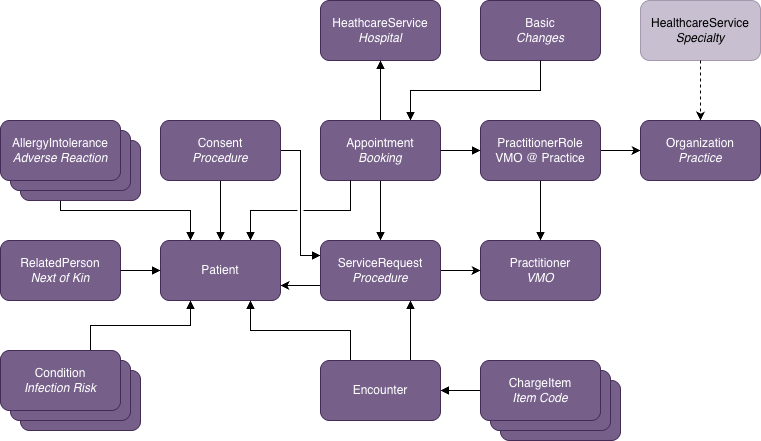
The FHIR Resources for a Theatre Booking as manifested through a FHIR Appointment are shown in the diagram below. The Appointment is at the centre of this set of FHIR Resources and related resources link to/from this resource allowing the package of resources to be discovered through an Appointment-based search.
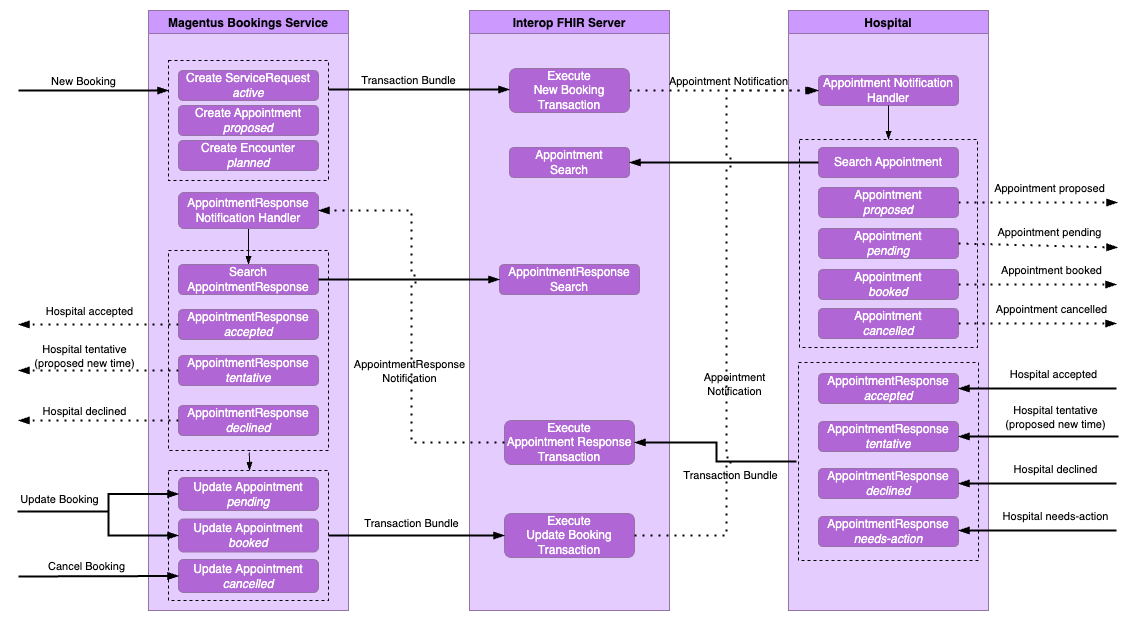
Unlike traditional healthcare integration approaches, our approach to Theatre Booking is not based on a point-to-point messaging model. Instead the VMO Practice Management System (PMS) and the Hospital interact through a shared FHIR server in which Appointments and AppointmentResponses are stored and then acted upon. Each partner tracks change in this common FHIR repository to understand the status of a Theatre Booking. Monitoring for booking changes can either be through polling with a FHIR search or via a subscription to changes based on search criteria of interest. Key to these interactions are changes in the Status of the Appointment and Status of a participant's agreement within the AppointmentResponse. There may be multiple iterations of Appointment updates and AppointmentResponse's.
The FHIR Profiles for the resources of interest are listed below.
Additional EBooking Resources are contained within the resources above. The FHIR profiles for these resources are listed below.
| Magentus Solutions Profile | FHIR® Resource |
|---|---|
| Bookings Anaesthetic Request | ServiceRequest |
| Bookings Prosthesis | Device |
| Magentus Coverage | Coverage |
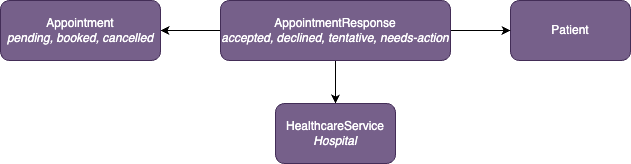
The FHIR Resources generated and referenced by the Bookings Partner are shown in the diagram below.
The FHIR Profiles used by the Bookings Partner are listed below.
| Magentus Profile | FHIR® Resource |
|---|---|
| Bookings Appointment Response | AppointmentResponse |
When a hospital receives a new or updated Appointment, it creates an AppointmentResponse to indicate its participation status. The response references the Appointment and identifies the hospital via a GSHealthcareService actor carrying the hospital's provider number.
Key fields
| Field | Description |
|---|---|
appointment |
Relative reference to the Appointment being responded to. |
participantType |
SNOMED CT coding — use code 22232009 (Hospital) for hospital responses or 116154003 (Patient) for patient responses (system http://snomed.info/sct). |
actor |
Reference to the hospital GSHealthcareService (with provider number identifier) or EBookingsPatient. |
participantStatus |
accepted | declined | tentative | needs-action |
start |
Date/time of the operation, or a requested new date/time if the hospital is proposing a change. |
comment |
Optional free-text note accompanying the status (e.g. "Awaiting admission form from patient"). |
Creating a response
POST [base]/AppointmentResponse
{
  "resourceType": "AppointmentResponse",
  "meta": {
    "profile": ["http://fhir.geniesolutions.io/StructureDefinition/ebookings-appointmentresponse"]
  },
  "appointment": { "reference": "Appointment/840fdd86-f273-4c56-89af-cc5dcda59" },
  "start": "2022-04-01T11:45:00.000+10:00",
  "participantType": [{ "coding": [{ "system": "http://snomed.info/sct", "code": "22232009", "display": "Hospital" }] }],
  "actor": {
    "reference": "HealthcareService/ashford-private-hospital",
    "identifier": {
      "type": { "coding": [{ "system": "http://terminology.hl7.org/CodeSystem/v2-0203", "code": "PRN" }], "text": "Hospital Provider Number" },
      "system": "https://www.health.gov.au/resources/publications/list-of-declared-hospitals",
      "value": "0065020L"
    },
    "display": "Ashford Private Hospital"
  },
  "participantStatus": "accepted",
  "comment": "Awaiting admission form from patient"
}
See AppointmentResponse Example for a full example.
Updating a response
To change an existing response (e.g. from tentative to accepted), PUT to the existing resource:
PUT [base]/AppointmentResponse/[id]
Bookings that end up in a cancelled state do not change from that final state. However, pending and booked states for a Theatre Booking can change depending on the status of an AppointmentResponse received from a Hospital and other business needs of the VMO. The following diagram shows the status changes in a booking.
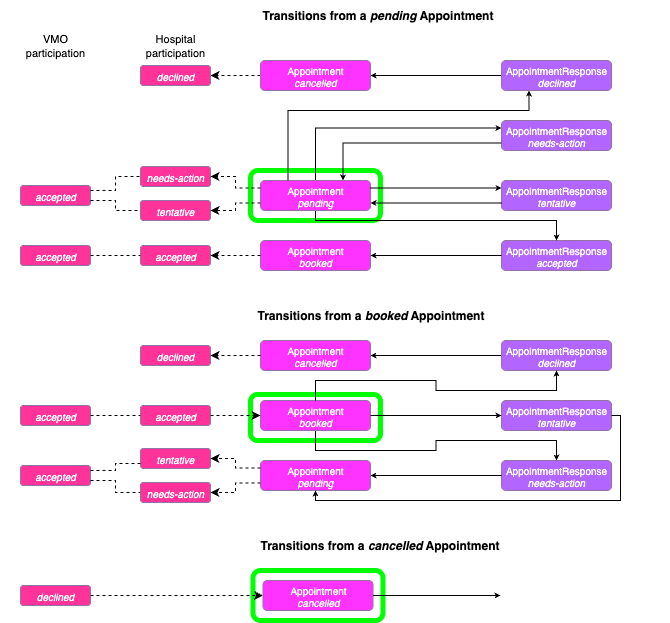
The valid Appointment.status transitions are:
| From | To | Trigger |
|---|---|---|
pending |
booked |
Hospital responds with accepted |
pending |
cancelled |
VMO cancels before hospital acceptance |
booked |
pending |
Hospital responds with needs-action (e.g. proposing a date change) |
booked |
cancelled |
VMO or hospital cancels a confirmed booking |
cancelled is a terminal state — no further transitions are permitted once a booking reaches this status.
Theatre Bookings typically go through a series of changes from the time they meet the minimum data set and are accepted into the FHIR server as a booking, up until the time of theatre. These changes are of a mixed blessing. Dealing with bookings that may change means that bookings will likely be accessible earlier and thus carry the intent of theatre if not the final theatre form. Restricting or inhibiting bookings from early exposure to the hospital is more likely to result in later sharing of theatre bookings by VMOs and less time to more efficiently use theatre slots or hospital resources.
Booking changes will reflect in one or more FHIR resources that are part of the Theatre Booking data set. There are a few ways of being notified of and processing these changes:
Appointment.Appointment resource for tracking changes and creation.
Appointment resource and these will not automatically create a notifiable change or creation in the Appointment subscription.Appointment does carry a lastModified extension which is updated when a 'change of significance' has occurred in the booking data. However, this is only a time field and does not tell you what changed. A change of significance includes: Appointment.status changes, changes to the procedure (ServiceRequest), changes to patient demographics, changes to ChargeItem codes, and changes to anaesthetic or consent resources. Minor updates such as adding a practitioner comment do not necessarily constitute a significant change.Basic resource that tracks changes, additions, and modifications to data in the booking. A customised Subscription can include this change data in the notification for an Appointment.Basic change resource itself. It will tell you of changes in the whole of the appointment/booking data including the links to the resources and attributes that have changed. You can then decide whether that resource should be downloaded so the nature of the change can be investigated.Option (3) is the recommended approach. Whichever is chosen a clear path should be defined for
The following GET searches for Appointment's which are either in a pending or cancelled state that were last updated after a provided time.
Example
GET [base]/Appointment?status=pending,cancelled&_lastUpdated=gt2022-12-13T12:30:00Z
In order to retrieve all booking data for the above Theatre Bookings, use the following _include and _revinclude parameters.
| Parameter | Value | Description |
|---|---|---|
| _include | Appointment:actor | Hospital, VMO, Patient |
| _revinclude | Basic:subject | Version difference overview |
| _include | Appointment:based-on:ServiceRequest | Procedure |
| _include:iterate | Patient:organization | Managing organization for patient |
| _include:iterate | ServiceRequest:requester | Practitioner VMO |
| _include:iterate | PractitionerRole:practitioner | Practitioner VMO (likely redundant) |
| _include:iterate | PractitionerRole:organization | VMO practice |
| _revinclude:iterate | Encounter:based-on | Encounter that created the appointment |
| _revinclude:iterate | Consent:data | Consent for procedure |
| _revinclude:iterate | ChargeItem:context | Cost codes (MBS+) for procedure |
| _revinclude:iterate | Condition:subject:Patient | Infection risks for patient |
| _revinclude:iterate | AllergyIntolerance:patient | Adverse reactions for patient |
| _revinclude:iterate | RelatedPerson:patient | Next of kin |
Example
GET [base]/Appointment?status=pending,cancelled & _lastUpdated=gt2022-12-13T12:30:00Z & _include=Appointment:actor & _revinclude=Basic:subject & _include=Appointment:based-on:ServiceRequest & _include:iterate=Patient:organization & _include:iterate=PractitionerRole:practitioner & _include:iterate=PractitionerRole:organization & _revinclude:iterate=Encounter:based-on & _revinclude:iterate=ChargeItem:context & _revinclude:iterate=Consent:data & _revinclude:iterate=Condition:subject:Patient & _revinclude:iterate=AllergyIntolerance:patient & _revinclude:iterate=RelatedPerson:patient
Note that
Basic resource which is profiled to carry a specification of all additions, deletions, and modifications to the whole appointment (see Theatre Booking Changes)HealthcareService included with the practice Organization resourceAn example search response is shown in Bookings Appointment SearchSet Bundle
A similar approach is used to search for a specific Appointment with a known id.
Example
GET [base]/Appointment?_id=840fdd86-f273-4c56-89af-cc5dcda59 & _revinclude=Basic:subject & _include=Appointment:based-on &_include:iterate=ServiceRequest:requester & _include=Appointment:actor & _revinclude:iterate=Encounter:based-on &_revinclude:iterate=Consent:data & _include:iterate=Patient:organization & _revinclude:iterate=ChargeItem:context &_include:iterate=PractitionerRole:practitioner & _include:iterate=PractitionerRole:organization
In order to receive notifications from the FHIR Server when resources of interest are created or updated, a Subscription is registered. A subscription request includes the following properties.
| Property | Description | Example |
|---|---|---|
| criteria | Search criteria to match resources of interest | Appointment?status=pending,cancelled |
| status | Fixed: requested | requested |
| reason | Reason the subscription is being created | Discover updates to the Appointment resource |
| channel.type | Fixed: rest-hook | rest-hook |
| channel.endpoint | Web service URL where webhook is posted | https://webhook.site/bbd78ee4-e267-4633-8acc-38a5e1dc54a0 |
| channel.header | Authorization header to be used in the subscription notification | Authorization: Bearer secret-token-abc-123 |
| channel.payload | Optional: mime-type of the payload to be included in the notification | application/fhir+json |
If the Subscription is successfully processed by the FHIR server, the Subscription.status will be changed to active. There are other optional attributes in a FHIR Subscription. Amongst these is Subscription.end that specifies a time at which the Subscription should be ended.
Example
The following example creates a new Subscription for the Appointment resource filtering on the status values of pending OR cancelled (Note: the comma delimitor between parameter values represents an OR, see https://hl7.org/fhir/r4/search.html#combining).
POST [base]/Subscription

{
  "resourceType": "Subscription",
  "criteria": "Appointment?status=pending,cancelled",
  "status": "requested",
  "reason": "Appointment pending and cancelled subscription",
  "channel": {
    "type": "rest-hook",
    "endpoint": "https://webhook.site/bbd78ee4-e267-4633-8acc-38a5e1dc54a0",
    "header": ["Authorization: Bearer secret-token-abc-123"]
  }
}
A subscription notification is received as a POST request on the endpoint specified in the subscription registration request. The POST request has an empty body unless Subscription.payload is specified, in which case the notification will be a PUT with the body containing the matching resource(s).
Example
POST https://webhook.site/bbd78ee4-e267-4633-8acc-38a5e1dc54a0
Authorization: Bearer secret-token-abc-123
The subscription notification shall respond as quickly as possible with a success status of 200 OK or 202 Accepted, and an empty body. The latter is normally returned when the request is accepted for processing but processing will commence after the response has been returned, which is the preferred approach for subscription notifications.
Any error response may result in a subsequent retry by the FHIR Server to submit the Subscription Notification until the number of retries is exceeded at which time the FHIR Server will stop the subscription. See Managing Subscriptions and Errors for more details.
If no payload is specified in the Subscription or additional Theatre Booking data is required then it is up the hospital to retrieve the data from the FHIR server using a search. This will be different depending on whether the notification included FHIR resource data such as an Appointment or if it was an empty notification.
If the id of the Appointment is available through the notification data then this can be used as the basis of the FHIR search. This is described in Retrieving a Specific Appointment above.
If an empty notification was received then a search for all recent Theatre Booking changes should be performed as described in Retrieving a Theatre Booking above.
Note
If the Subscription is for the Basic changes resource and that resource is included in the notification data through the channel.payload setting then data in that resource is sufficient to find all the changed Theatre Booking content. Note that this is not all the Theatre Booking data but rather links to only that which has changed. If the entire Theatre Booking data is required then follow the Retrieving a Specific Appointment guidance based on the Basic.subject reference to the Appointment.